
How To Check Word Count In Google Docs In 2026
Need to track word count in Google Docs? Word Count checker helps everyone. Students meet essay word limits easily. Writer crafts perfect blog posts. Professionals create concise reports quickly. The team monitors shared Google Docs word documents. Knowing word count saves time. It ensures your work fits the requirements.
But problems happen. Some can’t find the word counter online tool. Others struggle with mobile apps. Language settings confuse non-English users. This blog solves it all. Our step-by-step guide shows you how.
Why Is Word Count Important?
Word count matters for everyone. Student hits essay word limits for school. Writers create perfect blog posts for SEO. Professionals write short reports for small businesses. Educators check student’s work in Google Docs. Team track contributions in shared documents. Word count saves time. It keeps your work on track. Character count helps with social media posts. Pages show your document’s length. Use word count for newsletters or tech tutorials. It works for computer science projects, too. Google Docs makes counting easy anywhere. Meet goals with few clicks.
Ever Used Keyword Desnity Tool
Apart from word counter there are some other online tools that helps in professionals, and content writers, and students. A keyword density tool is a tool that allow users to calculate the keyword density of an article without any hassle. There are times when a studnet or a professional is working on an assignment or an article where they need to check the keywords that are being used in the repetitive mode.
Step-by-Step Guide On How To Check Word Count in Google Docs
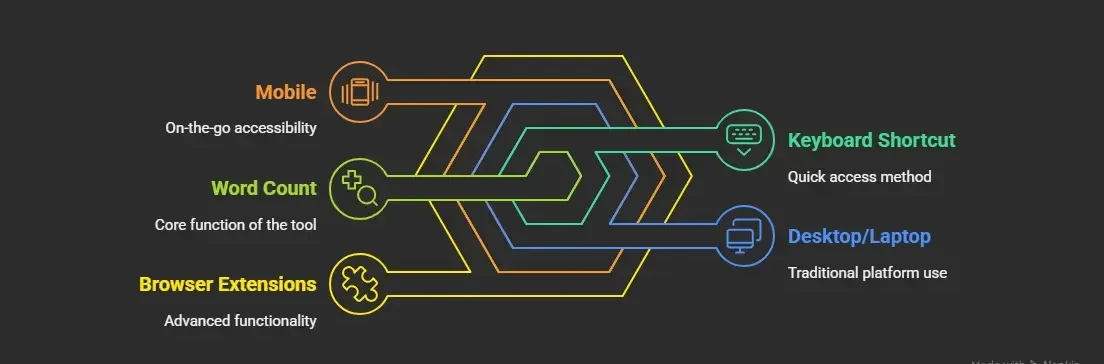
Ready to check word count in word Google Docs? This free tool makes it easy. Use it on desktop or mobile. Students, writers, and professionals love it. Our step-by-step guide covers every method. Try the Tools menu or keyboard word count shortcut google docs. Use the mobile app anywhere. Add word counter google docs extension for more features.
Method 1: Using the Tools Menu on Desktop/Laptop
• Open Google Docs via docs.google.com or Google Drive.
• Open your document.
• Click the Tools menu in the menu bar.
• Select Word Count from the dropdown menu.
• View the word count box includes words, characters, and pages.
Method 2: Using a Keyboard Shortcut on Desktop/Laptop
• For word count in Google Docs shortcut, Open your Google Doc.
• Press Ctrl+Shift+C for Windows or Cmd+Shift+C for Mac.
• View the pop-up window with word count, character count, and pages.
• Faster for frequent checks ideal for full-time writers.
• Save time every day.
Method 3: Checking Word Count for Selected Text
• Open your Google Docs document.
• Highlight a specific section of text.
• Go to Tools > Word Count or use Ctrl+Shift+C or Cmd+Shift+C.
• View the word count window, which shows stats for selected text only.
This is perfect for checking a section, e.g., introduction, summary, or conclusion. The count of words in these sections is according to the posts or instructions.
Method 4: Checking Word Count on Android
• Install the Google Docs mobile app from the App Store or Play Store (if not already installed).
• For word counter google docs app, Open your document.
• Tap the three dots menu icon in the top right corner.
• Select Word Count from the dropdown menu.
• View words, characters, and pages; tap elsewhere to close.
Highlight text for partial counts on Android.
Method 5: Checking Word Count on iOS/iPadOS
• Install Google Docs app from the App Store.
• Open a document.
• Tap the three dots (menu icon).
• Select Word Count.
• View word count details; tap anywhere to close.
Same process for iPadOS, ideal for iOS users on the go.
Method 6: Using Browser Extensions for Advanced Word Count
• Open Google Docs in Chrome.
• Install any word count extension.
• Enable the extension and highlight text or the entire document.
• View advanced statistics (e.g., unique words, readability).
Great for writers or computer science professionals needing detailed analytics.
How to Display Word Count While Typing
Want to see the word count as you write? Google Docs makes it super easy. Track words in real-time. Students meet essay word limits. Writers hit blog post goals. Professionals keep reports concise.
• Open your Google Docs document.
• Click Tools in the menu bar.
• Select Word Count from the dropdown.
• Check “Display word count while typing.”
• See the word count box at the bottom.
• Write and watch numbers grow.
This feature also helps with Google Slides notes. Use it anywhere with a Google account. Save your time. Try it now for your next project.
Troubleshooting What to Do If You Can’t Find Word Count
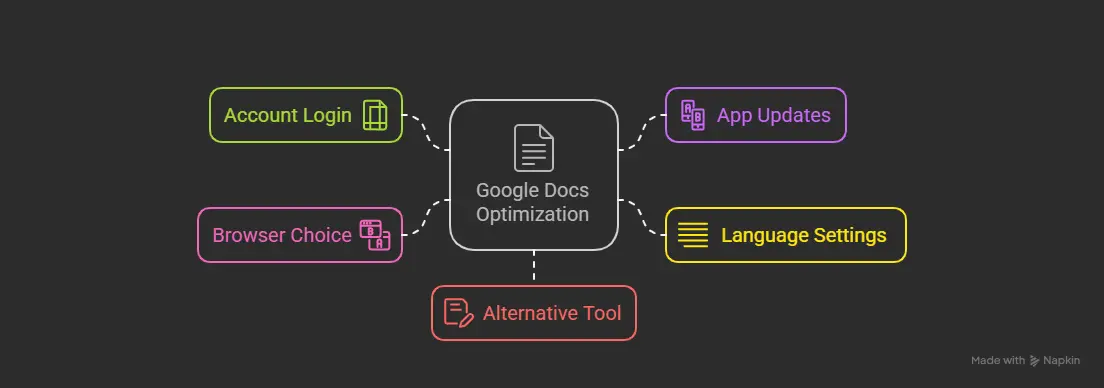
Struggling to find word count in Google Docs? It happens. Students, writers, and professionals can easily fix it. Use our pro tips to solve problems quickly. Keep your Google Docs document on track.
• Log in to your Google account: Visit docs.google.com. Sign in to access all features.
• Update Google Docs: Check the App Store. Install the latest version for Android or iOS.
• Adjust language settings: Change non-English document settings. Find word count in any language.
• Switch to Chrome: Use Chrome browser. It works best for Google Docs tools.
• Try Microsoft Word: Export your document. Check word count if Google Docs fails.
These tips save time. Use them anywhere with a Google account. Write without worry. Start troubleshooting now.
Pro Tips for Managing Word Count in Google Docs
Master word count in Google Docs. Students, writers, and professionals can work smarter. Our pro tips make counting easy. Save time and stay focused. Try these tricks today.
• Use keyboard shortcuts
Press Ctrl+Shift+C on Windows. Check word counts fast.
• Export as PDF: Save your document as PDF. Verify word count in other tools.
• Access via Google Drive: Open Google Docs from Google Drive. Track words anywhere.
• Try DocTools add-on: Install DocTools from Google Workspace. Get advanced word counter Google Docs online features.
• Track newsletter length: Keep newsletters short for small businesses. Hit the perfect word limit.
These tips boost your writing. Use them for essays. Blog posts or reports. Google Docs helps everyone.
When and Why to Use Word Count in Google Docs
Word count helps you succeed. Use it in Google Docs for many tasks. Our guide shows when and why to use it.
Meet essay word limits: Students write perfect essays. Hit 500-word goals fast.
Optimize blog posts: Writers craft SEO-friendly posts. Reach 1,500 words for tech tutorials.
Create concise newsletters: Professionals make short newsletters. Small businesses impress clients.
Track team documents: Teams monitor shared Google Docs. Ensure fair contributions.
Write computer science reports: Students submit clear reports. Meet word count rules.
Frequently Asked Questions
Does Google Docs have a word counter?
Yes, Google Docs has a built-in word counter. Access it by clicking Tools > Word count or using the shortcut Ctrl+Shift+C (Windows) or Cmd+Shift+C (Mac). It shows words, characters, and pages. You can also enable “Display word count while typing” for a live counter in the bottom-left corner.
What is the shortcut for word count?
The shortcut for word count in Google Docs is Ctrl+Shift+C (Windows) or Cmd+Shift+C (Mac).
How does Google Docs compare to Microsoft Word for word count?
Both are accurate, but Google Docs is cloud-based and free.
Can I check word count offline?
Limited offline support; ensure Google Docs is synced via Google Drive.
How to check word count in Google Docs?
Open your Google Doc. Click the Tools menu. Select Word Count. See the total number instantly.
How do you check how many words you have on Google Docs?
Use docs.google.com. Open your file. Press Ctrl+Shift+C. View many words in seconds.
How to see how many words are on a Google Doc?
Visit Google Docs. Open your document. Click Tools. Choose Word Count for stats.
How do you see how many words you have on Google Docs?
Access Google Docs online. Open your file. Tap the menu icon on mobile. Select Word Count.
How to check word count in Google Docs?
Open Google Docs. Click the Tools menu. Pick Word Count. Check statistics fast.
How to use word count in google docs?
Click Tools > Word count in Google Docs. For real-time tracking, check “Display word count while typing”. On mobile, tap the three-dot menu > Word count.
How to see word count on google slides?
Google Slides has no built-in word count. Copy text to Google Docs and use Tools > Word count, or export as plain text and use an online word counter.
What is the word count command google docs?
The word count google docs command is Ctrl+Shift+C (Windows) and word count google docs shortcut for Mac is Cmd+Shift+C.
How do I automatically turn on word count in Google Docs?
Click Tools > Word count, check “Display word count while typing”, and click OK. Counter appears in bottom-left corner.
Does google docs include footnotes in word count?
Google Docs does not include footnotes in the word count. To include them, copy footnote text into the main document body, check the word count with Tools > Word count or Ctrl+Shift+C, then remove the pasted text.
How do I check the word count Google Doc selection portion?
Highlight the text, then click Tools > Word count or press Ctrl+Shift+C (Windows) or Cmd+Shift+C ( for word count google docs Mac). The pop-up shows the selected text’s word count.
How to check word count in word Docs?
To check word count in Word docs:
– Windows/Mac: Look at the bottom-left status bar or press Ctrl+Shift+G (Windows) / Cmd+Shift+G (Mac).
– Mobile/Online: Tap the ⋮ or Tools menu → Word Count.
For selected text, highlight it first.
How do you make a counter on Google Docs?
Go to Tools > Word count, select “Display word count while typing”, and click OK. A live word counter appears in the bottom-left corner.
In The End
Google Docs makes tracking words fun and straightforward. This is a guide for users to analyze the Word Count in Google Docs shows you how to count many words easily. Access Google Docs on docs.google.com. Use the menu icon for word count google docs mobile to check stats quickly. Save your file to review the total number anytime. Trust tips from full-time experts with several years of experience. These steps work anywhere. Google Docs boosts your work with powerful features. Create school essays or business reports with ease. Track statistics to meet every goal.